
New Members Directory
Updated: Mar 27
Our new AIPN Member eDirectory is officially live on the AIPN website, and members can now log in to review and update their profiles.
To ensure you can connect and interact with fellow members, please take a moment to check that your profile information is accurate and that your visibility settings are correct.
How to Update Your Profile
Log in to your AIPN account and navigate to My Profile. From there, you can edit the following fields:
Name
Organisation
Position
Email Address (displayed on your member profile)
Phone Number (displayed on your member profile)
State/Region
LinkedIn Profile

On My Profile you will be able to update your profile picture. You can do this by clicking on your profile picture and uploading an image. You can also create a biography in the About section on your profile.
Profile Visibility
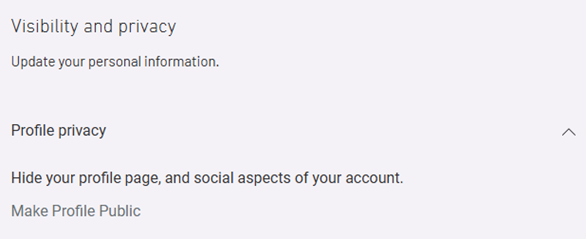
To ensure other AIPN members can find you and connect with you through the eDirectory, please ensure your profile visibility is set to PUBLIC. To set your profile to public, head to your Profile then click Edit Profile. Scroll to the bottom of the page and find the Visibility and Privacy drop down menu. Here you can Make Profile Public and ensure that you save all your changes prior to exiting.
Thank you for taking the time to update your details and helping us build a directory that strengthens connections across our Network.


Comments